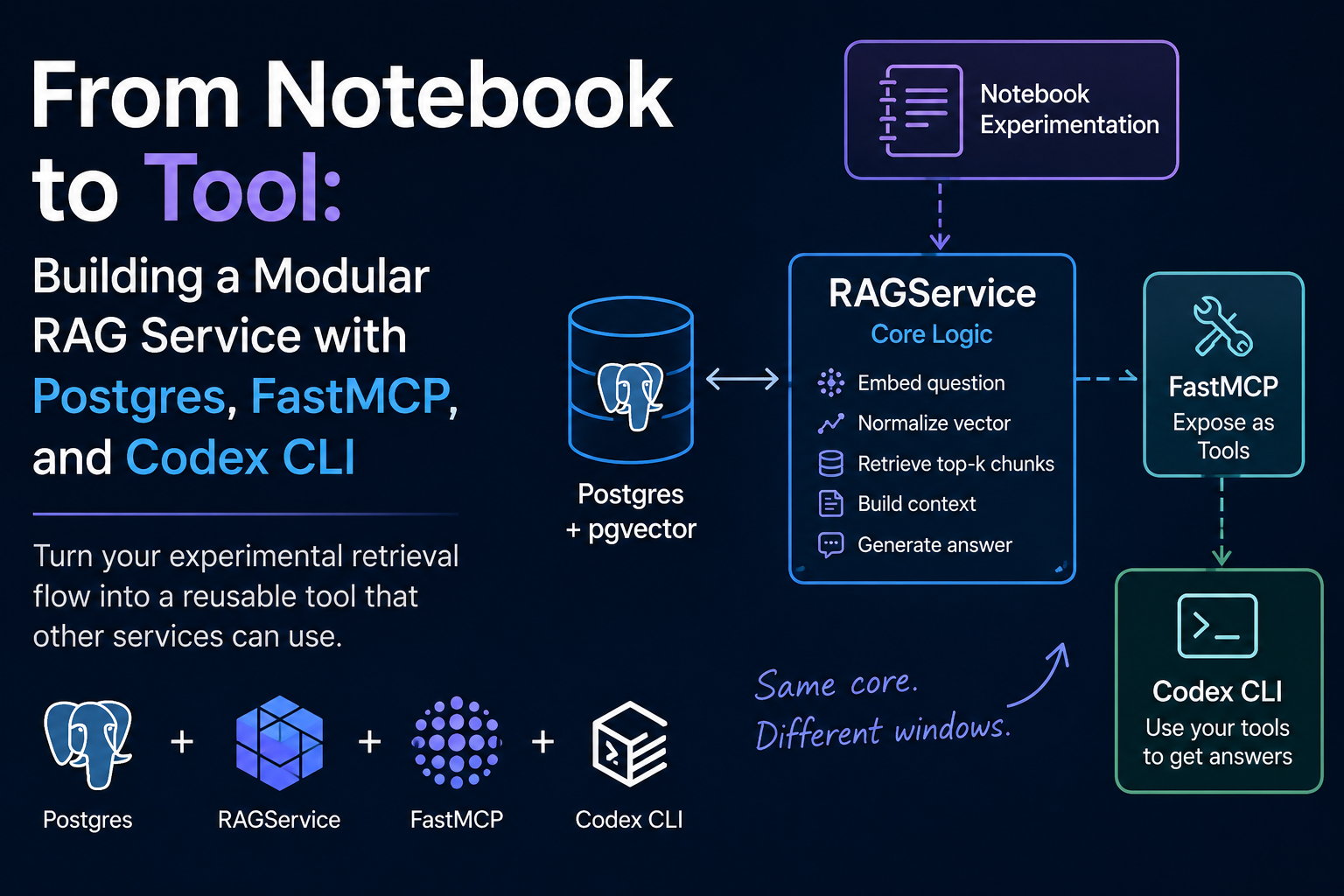
In a previous post on pgvector, I walked through how you can create your own low-cost RAG architecture. It showed you how to run a vector database, creating embeddings, and then query your data efficiently. This post is about what happens next: turning your experimental notebook retrieval flow into a tool which other services can use.
I find a lot of data scientists can build great models or systems, but struggle with making them usable. This can be from two directions: getting the data to the model and getting the results to the decision-maker. This matters because a good demo is nice, but reusable, modular code is critical.
Once you have the retrieval layer working, you do not want to rerun your notebook to ask a question, you want one clean class with a lightweight wrapper around it.
That is what I built in the my repo.
The core class
The important part of the repo is the RAGService class in app/rag.py. I love a good python class. When I first started learning them I wondered, “why would anyone do this to themselves?” Now I wonder, “why are you not using a class?”
My class is simple and not clever. The key is it works.
It does the following:
- embed the question
- normalize the vector when needed
- fetch the top matching chunks from Postgres
- builds a context block with the question
- retrieves an answer based on the context block
I have never heard someone say “simple is not correct.”
The class takes configuration up front:
RAGService(
    db_kwargs=settings.db_kwargs,
    api_key=settings.gemini_api_key,
    table_name=settings.table_name,
    k=settings.top_k,
    answer_model=settings.answer_model,
    embed_model=settings.embedding_model,
    embedding_dims=settings.embedding_dims,
    instructions=instructions,
)
If you wanted to reuse it for your own environment you only need to adjust your app/.env and your database/.env. I know that this is a little more complicated then production code, but again this is for learning to both run a vector database and create a reusable tool without needing multiple codebases.
The setup makes the code modular. It is not tied to a single table, model, or front end. You can change everything when you initialize the class just by updating your .env files or app/prompts.py.
You should care about achieving good modular code. The wrapper can change, e.g. fastapi for fastmcp, but the core behavior does not. Vibe coding will not achieve this on its own.
Why modular classes matter
This class can sit behind a few different things:
- a notebook (this is where experimentation often lives for data scientists)
- an API
- a CLI tool
- an MCP server
Each of the above cases is just a different window into the same room.
Your class should keep things simple and allow easy use. For example, a software engineer should not need to worry about normalizing vector embeddings. They should just need to know what to call and how.
FastMCP
Implementing your class through an MCP is straight forward if it is properly modularized.
I used FastMCP because although Model Context Protocol sounds scary, it is as simple as adding a few decorators and doc-strings.
In app/mcp_server.py, I create two tools:
@mcp.tool
def ask(question: str) -> str:
    """Answer a question using retrieved documents."""
    return rag.answer_question(question)


@mcp.tool
def retrieve(question: str) -> list[tuple[str, int, str]]:
    """Return the top-k retrieved documents for a question."""
    return rag.get_top_k_docs(question)
You only need to add the wrapper @mcp.tool and the docstrings, e.g. `“““Answer a question using retrieved documents.”””
ask is useful when you want the full retrieval-augmented answer.
retrieve is useful when you want to inspect the raw chunks.
FastMCP just exposes your class.
It is important to note that you will have implementation issues without the docstrings. When your LLM CLI of choice, here I use Codex, is exposed to the tools, it uses the document strings to understand when a question should use that tool for the answer. If you do not provide a docstring, the LLM will often fail to use the tool unless explicitly told to do so. This creates a poor user experience and complications for a frontend developer.
Setting up Codex CLI to use your tool
Lastly, you need to connect your tool to your Codex CLI.
The README has step-by-step instructions, but here are the highlights:
- Run the MCP server
- Add the MCP server entry to your Codex config
- Ask a question
The following runs the MCP server:
python -m app.mcp_server
Next add the following to your Codex config (mine is located at ~/.codex/config.toml):
[mcp_servers.vector_rag]
url = "http://127.0.0.1:8000/mcp"
Once added, Codex will be aware of the tool and can decide on its own to use it. This matters. The MCP layer exposes your class without needed custom API integration. This allows you LLM clients to discover and use them automatically.
Now instead of uploading a document to a chat UI, you can simply prompt the model and it will anchor responses to your data, not just the open internet or data used to train the model. This keeps workflows clean, simple, and repeatable.
Example chat using Codex CLI
Here is a brief example of using the Codex CLI to interact with the tool.
In your terminal run the following command to begin the Codex CLI.
codex
If you ask
what tools do you have access to?
You will see a list that contains vector RAG search tools. Next you can say something like:
Use the ask tool to determine who is winning the Ukraine Russian War?
The agent will explain what it is doing before using the tool:
• I’m checking the retrieved documents first, then I’ll give a direct assessment
  of whether either side appears to be winning and on what basis.

• Calling
  └ vector_rag.ask({"question":"Based on the available documents, who is winning
        the Russia-Ukraine war? Summarize the evidence and note if the answer is
        uncertain or depends on the metric used."})
It will then provide a response:
• No clear winner.

  Based on the retrieved documents, the war is still described as a conflict of
  attrition with shifting gains:

  - Ukraine has recovered substantial territory at different points.
  - Russia has also made recent advances, including key towns and front-line
    pressure.

  If you force a current read, Russia appears to have the edge in recent
  territorial momentum, but not a decisive overall win.
Your response may differ because in my tool I do not set all parameters, such as temperature, when calling the LLM.
Overview of this setup
Using my repo, you get the following:
- a vector database for storing your documents
- a modular class with RAG logic
- a FastMCP wrapper to expose your class as tools
- a Codex config which connects to your tools
Each layer is separated. You can replace the LLM CLI or update your database without breaking the other parts. It is simple enough to understand, but more importantly it is still flexible enough to reuse.
Summary
AI will never replace plumbers, but we need great plumbing to make our AI workflows seamless. MCPs are not magic, just good plumbing.
But good plumbing matters.
MCP gives you a clean way to expose python code to Codex and other services without rewriting the core logic. In this repo, the RAGService class handles the actual work, FastMCP turns it into tools, and Codex CLI becomes one more client that can ask questions against your data.
Keep logic modular, wrappers thin, and integration layers replaceable.